PHP – CRUD Islemler Serisi 4


Bir onceki PHP – CRUD Islemler Serisi 3 yazisinda view_customer.php paneli ile veri tabani uzerinde kaydetmis oldugumuz tum kayitlarin goruntulenmesini sagladik. Bu yazimizda ise, view customer paneli uzerinde bulunan listenin hemen yan tarafindaki edit butonunun aktiflestirilmesi icin gerekli php komutlarindan bahsediyor olucaz.
Bunun icin edit_customer.php ve update_customer.php dosyalariyla ilgili komutlari asagida inceleyebilirsiniz;
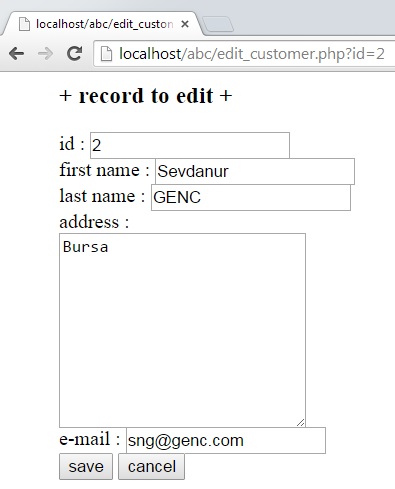
edit_customer.php
<?php $id = $_GET<'id'>
; //echo "<br/>you are on the edit_customer.php <br/>" mysql_connect("localhost","root","") or die ("could not connect the server"); mysql_select_db("d_base") or die ("could not connect the server"); $sql = "select * from customer where id = $id"; $result = mysql_query($sql); $row = mysql_fetch_array($result); ?> <html> <head> <title></title> </head> <body> <form method="POST" action="update_customer.php"> <blockquote> <h3>+ record to edit + </h3> id : <input type="text" name="id"/ value="<?php echo $row<'id'>
; ?>" readonly="readonly"><br/> first name : <input type="text" name="firstname" value="<?php echo $row<'firstname'>
; ?>"/><br/> last name : <input type="text" name="lastname" value="<?php echo $row<'lastname'>
; ?>"/><br/> address : <br/><textarea name="address" cols="25" rows="10"/><?php echo $row<'address'>
; ?></textarea><br/> e-mail : <input type="text" name="email" value="<?php echo $row<'email'>
; ?>"/><br/>
<input type="submit" name="submit" value="save"/>
<input type="button" name="cancel" value="cancel" onclick="location.href='index.php'"/>
</blockquote>
</form>
<body>
</html>
<?php
mysql_close();
?>
update_customer.php
<?PHP echo "you are on the update_customer.php <br/>"; $id = $_POST<'id'>
; $firstname = $_POST<'firstname'>
; $lastname = $_POST<'lastname'>
; $address = $_POST<'address'>
; $email = $_POST<'email'>
; mysql_connect("localhost","root","") or die ("could not connect the server"); mysql_select_db("d_base") or die ("could not connect the database"); $sql = "update customer set firstname = '$firstname', lastname = '$lastname', address = '$address', email = '$email' where id = $id"; $result = mysql_query($sql); mysql_close(); header("Location:index.php"); ?> Goruldugu gibi bir kayit uzerinde duzeltme islemlerini yapabilmek icin sql cumlesi olarak update satirini kullanmis olduk. Sirada ki ilgili makale icin ; PHP – CRUD Islemler Serisi 5 : https://sevdanurgenc.com/archives/4246 Keyifli calismalar dilerim.


Comments