Tablo2SQL-TR User Guide

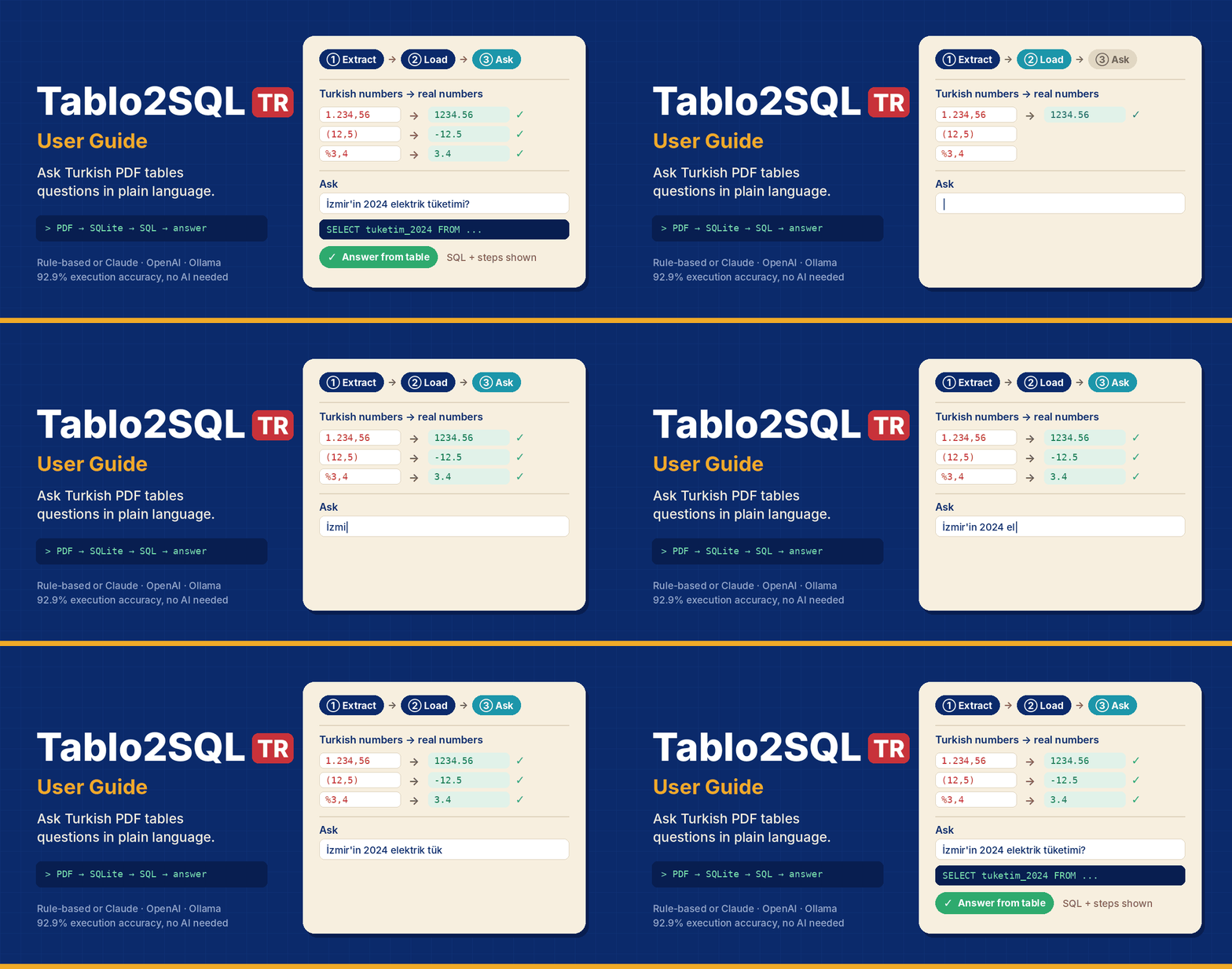
What is this software, and what is it for?
Tablo2SQL-TR is an application that runs on your own computer and opens in your browser. It reads the tables in Turkish PDF and HTML documents, turns them into a clean database, and lets you ask that database questions in everyday language. You do not need to know SQL, Excel formulas or programming. You type a question and get an answer taken from the actual values in the tables.
In short: it turns numbers locked inside reports into information you can query.
Why is it needed?
Public bodies, municipalities and companies publish much of their information as PDF reports: activity reports, budget execution tables, financial statements, statistical bulletins, fee schedules. Getting information out of these documents is still largely manual work.
An example: you have an 80-page municipal activity report. The question is simple: "What share of the 2024 personnel budget was actually spent?" The answer sits in a table somewhere in that report. But:
The table has merged header cells ("Budget" and "Actual" under a shared "2024" heading).
Numbers are written the Turkish way: 1.234.567,89. Tools that assume English formatting either cannot read them or silently turn them into a different number.
Negative values are in parentheses, percentages look like %4,5, dates like 15.03.2025.
The unit is often stated only in the table caption ("bin TL", thousand TRY).
The bottom row is the document's own "Toplam" (total) row. Summing the column without noticing it doubles the result.
Anyone who has pasted such a table into Excel knows how it ends: shifted columns, numbers stuck as text, hours of clean-up. General-purpose AI chat tools, on the other hand, often answer such questions with confident-sounding but invented numbers, and do not show where the answer came from.
We measured it: when the same tables are loaded without handling the Turkish number format, about three quarters of the answers break even when the SQL queries themselves are perfect. Tablo2SQL-TR was built to close exactly this gap.
What does it do?
Tablo2SQL-TR turns the job into three steps:
Extract. It finds the tables in PDF/HTML documents and resolves merged cells and multi-row headers.
Load. It converts Turkish numbers, dates and units into proper types and writes the tables into a SQLite database. It flags "Toplam" rows and keeps the units.
Ask. It translates your question into SQL, runs it, and corrects itself when something goes wrong. If the answer is not in the tables, it does not make one up. It says "this information is not in the tables".
You can download the resulting database as Excel, CSV, SQLite or a SQL dump and use it in other tools.
Who is it for?
Public-sector and municipal staff: pulling figures quickly from activity reports and budget tables.
Finance and audit teams: comparing income-statement lines and expense items across company reports.
Journalists and researchers: turning official statistical bulletins into queryable data.
Analysts: converting PDF tables into clean Excel/CSV files. Extraction and export are useful on their own, even if you never ask a question.
Text-to-SQL researchers: a research platform with a Turkish test set, an error catalog and evaluation tools.
What makes it different?
It understands Turkish formats. 1.234,56, (12,5), %3,4, Ocak 2024, the dotted/dotless İ/ı, and suffixed names such as "İzmir'in" are handled correctly.
It is transparent. Every answer comes with the generated SQL and every step the system took, so you can check it against the source table.
It says when it does not know. If the information is not in the tables, it refuses instead of inventing a number, and says why.
It classifies its own mistakes. When something goes wrong, it identifies the error type (date format, unit, value matching, calculation…) and corrects itself accordingly.
AI is optional. The rule-based engine works with no internet connection and no API key, and reaches 92.9% accuracy on the test set. You can connect Claude, OpenAI, or Ollama running on your own computer if you want.
Your data stays with you. In rule-based mode and with Ollama, no data leaves your computer.
What it is not
It cannot read scanned (image-only) documents. Add a text layer with an OCR tool first.
It does not modify your documents or the database; it only reads and queries.
It does not replace human judgement for important decisions. That is why it shows exactly how every answer was produced.
About this guide
This guide walks you from the first launch to advanced use. Everything works without AI. Connect Claude, OpenAI or a local Ollama model and almost every corner of the app gets smarter.
About the screenshots: the AI screenshots were taken against a test server that imitates the real APIs, so AI-generated text starts with [MOCK]. A real model will word things differently, and in more detail. The sample documents are Turkish, so table contents, column names and sample questions stay in Turkish even when the interface is in English.
1. Up and running in five minutes
Installation
Download the project and open the folder. Double-click the launcher for your operating system:
System | File | Note |
Windows | baslat.bat | If SmartScreen warns you: More info → Run anyway |
macOS | baslat.command | The first time: right-click → Open (Gatekeeper) |
Linux | baslat.sh | Run chmod +x baslat.sh if needed |
The launcher takes care of the rest:
It checks for Python 3.10+. If Python is missing, it tries to install it (winget / Homebrew / apt) or tells you where to get it.
It creates a virtual environment (.venv) and installs any missing packages.
It checks for Ollama and API keys and gives advice. Neither is required.
It finds a free port (starting at 8501) and opens your browser.
On the first run it offers to create a desktop shortcut. You can also do this later with the kisayol_olustur.* files.
The first launch can take a few minutes while packages install. Later launches take seconds.
First look

Figure 1. First launch: settings on the left, five workflow tabs on the right
The screen has two parts:
The sidebar: language and theme, the AI engine, agent options and knowledge-base actions.
The main area: five tabs that follow the workflow. ① Documents & extraction → ② Knowledge base → ③ Ask → ④ Error catalog → ⑤ Evaluation.
The app ships with six synthetic sample documents: a municipal activity report, provincial energy consumption, a company's financial report, water statistics, a price-index bulletin and a fee schedule. The knowledge base starts pre-loaded with them, so you can go straight to tab ③ and ask a question without uploading anything.
2. A tour of the sidebar

Figure 2. Sidebar
Language / Theme. Türkçe ⇄ English and Light ⇄ Dark. Your choices are remembered.
AI engine. The Provider list has four options:
Rule-based (AI off)
Claude (Anthropic)
OpenAI / compatible
Ollama (local)
The badge below shows whether AI is on. Where AI is used lists every place the AI touches.
Agent.
Self-correction loop: repairs faulty SQL automatically.
Max attempts: 3 by default.
Phrase the answer with AI: turns the result into a natural sentence.
Fall back to rule-based if AI fails: you still get an answer during network or quota problems.
The last two switches are only active when an AI provider is selected.
Knowledge base. Shows how many tables there are and where the database file lives. The Reset with samples, Empty and download buttons in four formats are here too.
3. Step ①: Upload a document and extract tables
Drag in a PDF, HTML, CSV or XLSX file, or pick one of the sample documents.
Choose a PDF extractor:
auto (recommended): tries pdfplumber for ruled tables first and falls back to Camelot-stream.
pdfplumber: ruled tables.
camelot-lattice: ruled tables, alternative engine.
camelot-stream: unruled, whitespace-aligned tables.
Choose a Number parsing mode:
tr (the correct one): 1.234,56 → 1234.56, (12,5) → −12.5, %3,4 → 3.4.
en: assumes English number format. For comparison.
text: keeps numbers as text. For comparison.
Click 🔍 Extract tables.
Each table opens in its own panel. You see the raw grid, with merged cells highlighted, next to the resolved headers, each column's type and unit, and the schema that will be created:

Figure 3. Raw grid: merged header cells highlighted, resolved columns below
What to look for here:
Header rows: two-level headers such as "2023 / 2024" become single column names such as butce_2024 and gerceklesme_2024.
Units: phrases like "(bin TL)" (thousand TRY) are read from the caption or the column header and stored with the column.
Total rows: the document's own "Toplam" row is not deleted. It is flagged with toplam_satiri = 1, so SUM() does not double-count.
Unparsed values: cells that should be numeric but could not be read are listed as warnings.
If everything looks right, click ⬇️ Import all into the database. Importing the same document again replaces the old copy, so tables are never duplicated.

Figure 4. After import: success message and per-table download buttons
4. Step ②: Knowledge base and downloads

Figure 5. Knowledge-base tab: tables, schema and export buttons
This tab shows each table in the database: its source, columns, types, units and data. It also shows the schema description that is sent to the model. With AI on, the description also includes a table summary and column descriptions.
If you know SQL, the SQL console (read-only) lets you run your own SELECT queries. It rejects anything that would modify the database.
Downloading the database. You can export the finished knowledge base in four formats:
Format | When to use it |
SQLite (.db) | For DB Browser, DBeaver, Python or R. Includes the metadata tables (_tablolar, _sutunlar). |
Excel (.xlsx) | One sheet per table. Numbers come through as real numbers, not text. |
CSV (.zip) | One CSV per table. Saved as UTF-8 with BOM, so Turkish characters survive in Excel. |
SQL dump (.sql) | For loading into another database or putting under version control. |
Tip: a value that a Turkish document shows as 1.234,56 is stored as the number 1234.56. Excel displays it in your locale's format, and sums and formulas just work.
5. Step ③: Ask questions
Go to tab ③ and type your question:
İzmir'in 2024 elektrik tüketimi ne kadar? ("What was İzmir's electricity consumption in 2024?")

Figure 6. Q&A: the answer, the generated SQL and the expanded agent steps
Small badges above each answer show the status (answered / unanswerable), the number of attempts, the engine used and the time taken. The generated SQL sits below. Expand Agent steps to follow what the system did:
🧭 Schema linking: picks the tables relevant to the question.
✍️ Attempt N: candidate SQL: generates SQL.
🔎 Static check: looks for typical mistakes before running anything. Examples: a Turkish-format date such as '15.03.2025', a number such as '1.234,56', or a column that is not in the schema.
▶️ Execution: runs the SQL on a read-only connection. Your database is never modified.
🔁 Feedback: if something went wrong, the error type and a fix suggestion go into the next attempt.
✅ Result or 🚫 Unanswerable.
"This information is not in the tables"
Perhaps the most important feature is that the system knows when it does not know. The sample documents do not contain Mersin:

Figure 7. Unanswerable question: instead of guessing, the system says the information is not in the tables
The system looks up the value from the question ("Mersin") in the database. If it is missing, or the query returns nothing, the system does not invent a number. It abstains and says why. On the test set it correctly abstains on 90.9% of unanswerable questions. Its false-alarm rate on answerable questions is 5.7%.
Tips for good questions
Use the names that appear in the table. "İzmir", "Personel Giderleri", "2024".
Specify the period. "In 2024 …" is more reliable than "last year …".
Turkish numbers and dates are fine. Write 15.03.2025 or 1.250; the system converts them.
Ask for calculations. Sums, averages, max/min, percentage change, ratios ("… per person …").
The rule-based engine understands Turkish questions only. To ask in English, turn on an AI provider.
6. Turning on AI
The app works fully without AI. The rule-based engine reaches 92.9% execution accuracy on the test set. Turning AI on adds:
Understanding of free-form and indirect questions ("which district saw the biggest growth in water subscribers?")
Questions in English
Answers phrased as natural sentences
Smart suggestions throughout the app
Choosing a provider
Provider | Needs | Where does the data go? | Cost |
Claude | ANTHROPIC_API_KEY | Anthropic API | Pay per use |
OpenAI / compatible | OPENAI_API_KEY (+ optional base URL) | OpenAI or the endpoint you choose (OpenRouter, vLLM, LM Studio…) | Pay per use / varies |
Ollama | Ollama installed and running | Never leaves your computer | Free |
Enter your key once. Copy .env.example in the project folder to .env and fill in your key. The app reads this file at every launch. You can also type the key in the sidebar, but then it only lasts for that session. Keys are never written to the preferences file.
The model list syncs itself
You never have to type a model name. Once you pick a provider and enter a key, the app fetches the available models from the provider's API. If the list has changed, click 🔄 Sync models.

Figure 8. The Claude model list fetched from the API
Claude: models are listed newest first. The first one is the default.
OpenAI: on the official endpoint only chat models are listed. Embedding, audio and image models are filtered out.
Ollama: the models installed on your machine are listed.
Then click 🔌 Test connection. It sends one tiny request to confirm everything works.
Ollama: fully local and free
Install and start Ollama from ollama.com.
Select Ollama (local) as the provider.
If you have no models yet, open ⬇️ Download model. Pick a recommended model, such as qwen2.5-coder:7b, and download it. A progress bar shows inside the app; no terminal is needed.

Figure 9. Ollama: installed models and in-app model download
A 7–8B parameter model needs about 8 GB of RAM. On smaller machines try something like qwen2.5-coder:3b.
What changes when AI is on?
A summary of Where AI is used:
① Extraction: AI suggestions. For each table, the AI proposes:
a short, meaningful name (e.g. il_elektrik_tuketimi)
a one- or two-sentence summary
column descriptions and units
warnings about anything suspicious in the parsing
Applying them is optional, controlled by Apply AI suggestions on import. Deterministic extraction always remains the primary source. Applied summaries and descriptions go into the schema description, which directly helps SQL generation.

Figure 10. AI suggestions tab: table name, summary, column descriptions and warnings
③ Ask: suggested questions. The AI suggests questions that use the actual values in your database. Click one to ask it right away, or use 🔄 New suggestions for another set.

Figure 11. Questions suggested by the AI from the database
③ Ask: self-correcting SQL. In the example below the model wrote the date in Turkish format on its first try ('15.03.2025'). The static check flagged it as a TARIH_BICIMI (date format) error and fed back the hint "dates are stored in ISO format". The second attempt ran correctly:

Figure 12. Self-correction: a date-format error in attempt 1, the correct SQL in attempt 2
Other AI features:
Phrased answers: a full sentence instead of "Answer: 1,048.33 TL". Numbers use the selected language's format.
Schema narrowing: when the database has many tables, the AI picks the ones relevant to the question.
④ Error catalog: explains errors in plain language (see below).
⑤ Evaluation: groups failures into themes.
Fallback to rule-based: if the AI does not respond (network, quota, bad key), the question is answered by the rule-based engine. This shows up in the agent steps as "Fell back to rule-based".
Cost control. The sidebar status card shows the number of requests and tokens used in the session. AI responses are cached on disk, so you never pay twice for the same table or error.
Privacy: what is sent to the AI?
With a cloud provider (Claude/OpenAI), the following data goes to that provider:
Feature | What is sent |
SQL generation | The question + the schema: table/column names, descriptions, up to 25 distinct values per text column, and sample values |
Table suggestions | Table caption, column information, the first 5 rows |
Phrased answers | The question, the SQL and the first 20 result rows |
Error explanation | The error record: question, SQL, error message |
Evaluation analysis | Question/SQL/answer of the failed examples |
If you work with confidential documents, use Ollama. Your data stays on your machine.
7. Step ④: The error catalog
Every mistake the system makes is logged with its type. This tab shows those records as cards:

Figure 13. Error catalog: type distribution and error cards
Type | Meaning | Typical example |
SEMA_ESLEME (schema linking) | Table/column does not exist | tuketim instead of tuketim_2024 |
DEGER_ESLEME (value linking) | The value is written differently in the database | "izmir" ↔ "İzmir", "Istanbul" ↔ "İstanbul" |
BIRIM (unit) | Unit confusion | Asked in million TL, answered in thousand TL |
TARIH_BICIMI (date format) | Turkish-format date | '15.03.2025' instead of '2025-03-15' |
SAYI_BICIMI (number format) | Turkish-format number | '1.234,56' compared as text |
SAYISAL_AKIL (numeric reasoning) | Calculation error | Wrong denominator in a percentage change, counting the "Toplam" row twice |
SOZDIZIMI / YURUTME (syntax / execution) | The SQL did not run | Missing parenthesis, wrong function |
BOS_SONUC (empty result) | The query returned nothing | Wrong filter value |
CEVAPSIZLIK (abstention) | Wrong abstention decision | Rejecting an answerable question, or the reverse |
With AI on, each card gets an 🤖 Explain this error with AI button. The explanation comes under three short headings: What happened? Why? How to fix it?

Figure 14. AI error explanation
8. Step ⑤: Evaluation (for researchers)
This tab measures the system on the TR-TabloSQL test set. The set has 99 questions: 64 for development, 35 held out for testing, 11 unanswerable, across 20 categories. The metric is execution accuracy (EX): the result of the generated SQL is compared with the result of the gold SQL, within a small numeric tolerance.

Figure 15. Evaluation: summary metrics and the list of wrong answers
Number modes: run tr, en and text side by side to see the effect of Turkish number format for yourself. With the rule-based engine, EX is 92.9% for tr, 29.3% for en and 13.1% for text.
Details: each question's correctness, error type, answer and SQL. Wrong answers only narrows the list.
With AI on, 🤖 Analyse failures with AI groups the failures into 3–5 themes and suggests improvements.
If the selected backend is an AI provider, every question triggers API calls. 99 questions × 4 modes can add up to a noticeable cost.
9. Language and theme
The whole interface is available in Turkish and English. Switching the language also switches the menus, agent steps, error explanations and number formats (1.234,56 ⇄ 1,234.56). AI responses come back in the selected language. The database content stays in the language of the source documents (Turkish).
The dark theme is easier on the eyes in long sessions:
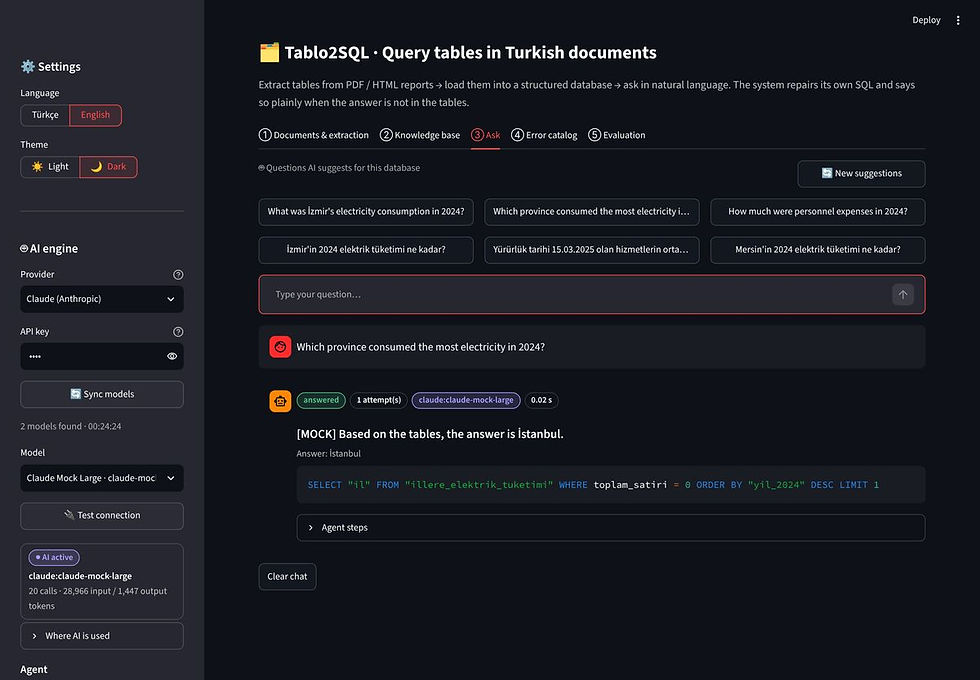
Figure 16. Dark theme
Your language, theme, provider and model choices are saved in outputs/.arayuz_ayarlari.json and restored at the next launch. API keys are never written to this file.
10. FAQ and troubleshooting
"Python not found". The launcher offers to install it. If that fails, install 3.10 or later from python.org. On Windows, tick "Add python.exe to PATH" in the installer.
The browser did not open / the port is busy. The launcher searches for a free port starting at 8501. The address is printed in the terminal window, for example http://localhost:8502. To use a specific port, run python scripts/baslat.py --port 8600.
No tables were found in my PDF.
The document may be scanned (images only). Add a text layer with an OCR tool first, for example ocrmypdf.
If the table has no ruling lines, switch the extractor to camelot-stream.
Numbers stayed as text. Make sure the number-parsing mode is tr. If the raw grid shows "unparsed" warnings, those cells use an unusual notation (e.g. 1 234,5 or —).
The model list is empty.
Claude/OpenAI: the key may be wrong (401). 🔌 Test connection shows the error message.
Corporate network: a proxy may be blocking the API address.
Ollama: is Ollama running? Try ollama list. The default address is http://localhost:11434; if yours differs, set OLLAMA_HOST in .env.
My English question was not understood. The rule-based engine is built for Turkish questions. Turn on an AI provider for English.
The answer is wrong but the system sounds confident. Expand the agent steps and look at the generated SQL. Usually there is a mismatch between a phrase in the question and a table or column name. With AI on, the explanation in the error catalog helps too. Errors from questions asked in the UI are logged to outputs/arayuz_hatalari.jsonl, and evaluation errors to outputs/hata_gunlugu.jsonl. Both make good bug reports.
11. Command line (advanced)
All experiments also run without the interface. Use the virtual environment's Python: .venv\Scripts\python on Windows, .venv/bin/python elsewhere.
# End to end: samples → databases → test set → evaluation → HTML report
python scripts/run_all.py
python scripts/run_all.py --hizli # tr mode only ("hızlı" = quick)
python scripts/run_all.py --claude # + Claude (model picked automatically)
python scripts/run_all.py --openai gpt-4o-mini # + a specific OpenAI model
python scripts/run_all.py --ollama # + the first installed Ollama model
python scripts/hata_enjeksiyonu.py # error-catalog detection rate on 159 perturbations
python scripts/makale_sayilari.py # every number in the paper, with confidence intervals
python -m pytest tests/ -q # 42 tests
# A test server for trying the AI features without a key
python tests/mock_llm_server.py # imitates the Anthropic/OpenAI/Ollama APIs (port 8765)
# Point the app at it in .env:
# ANTHROPIC_BASE_URL=http://localhost:8765 ANTHROPIC_API_KEY=test
# or OLLAMA_HOST=http://localhost:8765
Results are written to outputs/:
basarim_raporu.html: the performance report; open it in a browser.
ozet.json
sonuclar/: per-question results.
hata_gunlugu.jsonl: the error log.
Tablo2SQL-TR is an open research prototype. The sample documents are synthetic and do not represent real institutions. For important decisions, always check the answer against the source table. The SQL and result rows in the agent steps are there for exactly that.


Comments